
Win Plus
SETIAEntertainment
3.26.00 Reviews
- Version
- 2.6.0
- Installs
- 50.00K
- Age Rating
- Everyone 10+
Screenshots




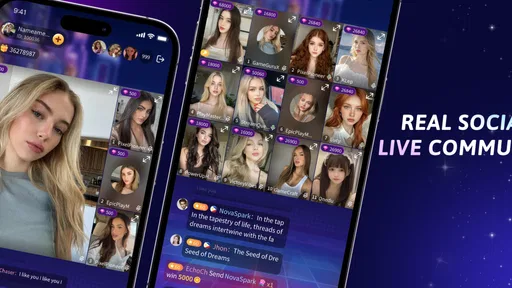

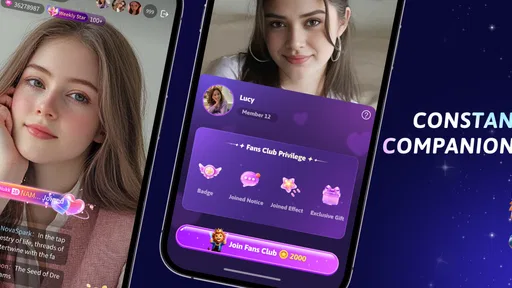
Our Review of Win Plus
 Analysis by Appyee
I approached Win Plus as an entertainment app for people who want live conversation mixed with casual party play, rather than as a traditional single-player game. Its basic appeal is easy to understand: open the app when you want company, join a social moment, and use games as a reason to interact. That combination can feel more welcoming than an empty chat room, especially when you are joining people you do not know well.
My experience also showed that the app depends heavily on the quality of its live community. The idea is more engaging when other participants are active and the pace feels natural. When the room is quiet or the conversation moves too quickly, the entertainment value drops. That makes this a very different recommendation from a self-contained puzzle or offline game. I would consider it for social users who enjoy spontaneous interaction, but I would not choose it for someone looking for predictable solo content.
How the app feels to use in everyday situations
SETIA presents Win Plus as a free entertainment app, with a general audience that begins at Everyone 10+. It has passed the early discovery stage with over 50 thousand installs, while its average rating sits at 3.2 from over 200 ratings. To me, that combination suggests a product with a real audience but also a mixed experience: enough interest to make the social concept worthwhile, yet not such a consistently polished experience that I would recommend it without reservations.
The first thing I noticed is that the app makes more sense when I treat it as a place to drop into rather than a destination that requires a long session. A short visit during a break, a casual evening with friends, or a moment when I want light conversation fits the concept well. I would be less enthusiastic about planning an entire night around it unless I already knew that the people I wanted to meet were active there.
A realistic example would be a group of friends who cannot meet in person but want something more interactive than sending messages. One person can start a conversation, and the party-game element gives everyone a shared activity instead of forcing somebody to carry the discussion. That small difference matters. A game prompt can break awkward silence, give quieter participants an opening, and make a social session feel less like an interview.
Readability and navigation during a live session
For an app built around live chat and party games, clarity matters more than visual decoration. I found that the most important information is not simply whether a button looks attractive, but whether I can quickly understand where the conversation is happening, what action is expected, and how to return to the previous activity. Live environments already create pressure because messages and events may change while I am reading them.
I recommend spending a few minutes exploring the interface before joining an important session. That gives you time to identify the controls for entering a room, participating in a game, and leaving or changing activities without interrupting the group. This is especially useful for anyone who reads slowly, prefers to understand an interface in advance, or becomes uncomfortable when several elements compete for attention.
The app’s social format can be easier to approach than a large general-purpose messaging platform because the purpose of the interaction is clearer. On a normal chat service, I may need to create the topic myself. Here, the party-game setting can provide context. The trade-off is that a live interface may be less forgiving if I miss an instruction or arrive halfway through an exchange.
I would like the experience more if every important action were immediately obvious to a first-time user. In a social game, confusion is not only a personal inconvenience; it can make the user feel as though they are slowing everyone else down. My practical advice is to begin with a low-pressure session, observe how the room works, and only then take a more active role.
Text size and visual contrast are also important considerations for anyone with reduced vision or visual fatigue. I would not assume that a lively interface is automatically easy to read. If you rely on enlarged system text, a screen reader, or strong contrast, test the core flow before committing to regular use: opening the app, finding the live area, reading the current exchange, responding, and exiting. Those are the actions that determine whether the app is genuinely usable for you.
Motor and sensory demands
Win Plus may suit users who prefer short actions over complicated controls, but live participation can still create motor demands. Tapping quickly, switching between chat and game activity, and keeping up with changing content may be tiring for someone with limited dexterity, tremors, or hand pain. The challenge is not necessarily the complexity of an individual action; it is the repeated timing and the need to react while the session continues.
For that reason, I would use the app in shorter bursts if repeated tapping becomes uncomfortable. A stable phone position, a larger touch target created through system settings where available, and a calm seating position can make a difference. These are simple adjustments, but they help separate the social value of the app from the physical strain of holding and operating a phone continuously.
Sensory sensitivity is another consideration. Live chat and party play can combine moving content, changing prompts, conversation, and the expectation of immediate responses. Even without assuming any particular visual or audio effects, that kind of activity can feel intense. I found it better to choose quieter moments and avoid treating every game round as something I must follow perfectly.
Users who are sensitive to noise should also think about where they plan to use it. In a shared room, public transport, or a busy workplace, following live interaction may be harder than it appears. Headphones can improve privacy, but they may not be suitable for everyone, and they can make it harder to notice what is happening around you. I would choose the setup based on safety first, especially outdoors or near traffic.
People who communicate more comfortably through text may find the chat side more approachable than a voice-centered social app. However, text still moves quickly in a live setting. If you need extra time to compose a message, the group may have moved on before you send it. That is not a personal failure; it is a limitation of fast social timing. I would look for rooms or groups where the pace feels respectful instead of forcing myself to match the fastest participants.
Situational access: when the format works best
The strongest use case is a relaxed social window when I have enough attention to follow a conversation but do not want a demanding game. A short evening session with friends, a casual gathering where people want an icebreaker, or a break shared with someone in another location all fit naturally. The game element gives the visit a purpose, while the live chat keeps it from feeling like a menu of disconnected challenges.
It can also help when a group has different levels of enthusiasm. One person may want to talk, another may want to play, and a third may simply watch before joining. A social game environment can accommodate those different levels more naturally than a competitive match that expects everyone to perform from the start. Still, this depends on the room culture. If participants push for constant responses, the flexibility disappears.
I would not use it while driving, walking through complicated traffic, or handling equipment. A live app encourages attention shifts, and even a quick reply can become unsafe in the wrong setting. The same applies to work or study: the low commitment can make it tempting to check repeatedly, but the stream of social activity may be more distracting than a normal offline game.
For families, the Everyone 10+ age guidance is useful as a starting point, not a substitute for supervision. A child’s suitability depends on the people they meet, the conversations they encounter, and their ability to handle live social situations. I would explain privacy and respectful communication before allowing independent use, and I would prefer shared use at first so the child understands how to leave an uncomfortable interaction.
The app is available for devices running Android 8.0 or later, which covers a broad range of phones but still makes the operating-system requirement worth checking before installation. On an older device that already struggles with multitasking, live interaction may feel less comfortable than on a newer phone. I would close unnecessary apps, keep the system updated where possible, and test the experience before inviting a group to depend on it.
What the free model means in practice
Win Plus is free to install, which lowers the barrier to trying it with friends. That is important for a social app: if everyone has to pay before discovering whether the community suits them, organizing a session becomes difficult. The free entry point lets me evaluate the interface, the pace of interaction, and the type of people using it before spending anything.
There are in-app purchases ranging from $0.49 to $84.99 per item. That wide range is a reason to be deliberate. I would not buy anything during the first session, especially if I was still learning what the app offers and whether I would return. Anyone sharing a device with children should review purchase protections in the operating system and make sure payment approval is controlled.
The most useful way to judge the paid side is to ask whether it changes a genuine problem for you or merely adds pressure to keep participating. If a purchase is connected to convenience or optional expression, it may be reasonable for a regular user. If it feels necessary to join the social experience, the free version may not provide the relaxed entry that initially attracted you. I would set a personal spending limit before exploring optional items.
Compared with a conventional messaging app, the advantage here is the built-in reason to interact. Compared with a standalone party game, the advantage is the live social setting. The compromise is control. A messaging app usually gives me more freedom over when I respond, while an offline game gives me more predictable pacing. Win Plus sits between those options, and that middle ground will either be its main strength or its main weakness depending on your habits.
Remaining barriers and who should choose another option
The clearest barrier is dependence on live participation. If I want content that works at any hour, does not rely on strangers, and can be paused without social consequences, I would choose an offline game instead. If my priority is private, carefully managed communication, a familiar messaging service may be a better fit. Win Plus is most convincing when the social layer is the point, not an extra feature.
A second barrier is the uneven pace of group interaction. Fast readers and confident participants may find it easy to jump in, while people who need more time may feel left behind. I would not recommend it as the only social option for someone who finds rapid chat stressful. A slower community or an asynchronous platform would provide more control and less pressure.
There is also a privacy and comfort dimension whenever an app connects users in a live environment. I would avoid sharing personal contact details, location information, school or workplace details, or anything that could identify where I live. If a conversation becomes uncomfortable, leaving is more important than being polite. The entertainment value is never worth staying in a situation that feels unsafe.
Accessibility should be judged through your own device and circumstances rather than through the category label. A user with visual, motor, hearing, cognitive, or sensory needs should test the complete journey, not just the opening screen. Can you read the active conversation? Can you understand the game instruction? Can you respond without rushing? Can you exit without assistance? Those practical questions reveal more than a general claim that an app is accessible.
Another limitation is that a live social product can be difficult to evaluate from one brief visit. The experience may change with the room, the time, and the people present. I would give it a small trial period rather than judging it solely by the first interaction, but I would also avoid spending money until the pattern feels consistent. That approach protects both your budget and your patience.
My inclusive verdict after testing the concept
Win Plus is a reasonable choice for people who want conversation and casual party play in the same place. I like the way the game element can reduce the awkwardness of starting a chat, and I can see it working well for friends who want a light shared activity without arranging a formal online event. The free entry makes that experiment straightforward, while the broad device requirement keeps it available to many Android users.
My recommendation is more cautious for users who need slow pacing, highly predictable navigation, or complete control over when interaction happens. The live format can create pressure, and the experience depends too much on the surrounding community to be universally comfortable. I would begin with a short, low-stakes session, check how readable and manageable the interface feels, and use the app only in settings where attention and privacy are protected.
SETIA’s current version is 2.6.0, and that gives prospective users a clear point of reference when checking compatibility. I would keep expectations realistic: this is not a replacement for every chat service or every party game. Its value comes from combining those two purposes, and that combination is strongest when you already want social contact.
Overall, I would recommend trying Win Plus to a friend who enjoys spontaneous online company and does not mind adapting to a live pace. I would not recommend it to someone seeking quiet solo entertainment or an accessibility experience that can be assumed without personal testing. The best reason to install it is the shared moment, not the promise of a perfect game. If that shared moment is what you are looking for, the app is worth a careful trial; if not, a slower or more private alternative will probably serve you better.
Verdict
Strengths of Win Plus
- Simple interface that is easy to understand for new users
- Offers quick access to its main features from the home screen
- Runs smoothly on most modern Android and iOS devices
- Useful notifications help users stay updated on relevant activity
- Free to download with no complicated setup process
Limitations of Win Plus
- Some features may require registration or personal information
- Advertising can interrupt the experience in certain sections
- Performance may vary on older devices or slower connections
- The app may collect usage data depending on privacy settings
- Customer support options could be limited for troubleshooting
Similar Picks in This Category
View All
Google Play Games
Google LLC3.9

Netflix
Netflix, Inc.4.8

YouTube Kids
Google LLC4.2

Disney+
Disney4.4

Prime Video
Amazon Mobile LLC4.7

Steam
Valve Corporation3.2
Frequently Asked Questions
What is Win Plus, and what can I use it for?
Win Plus is presented as an entertainment and rewards-focused application, but its exact features may vary depending on the version, region, and developer. Before downloading, review the official store description carefully to understand whether it offers games, promotional activities, bonuses, or other services. During testing, users should also check the available menus, eligibility rules, and account requirements rather than assuming every advertised feature is available everywhere.
Is Win Plus free to download and use?
The application may be free to download, but that does not always mean every feature is completely free. Win Plus could include optional purchases, advertising, paid entries, subscriptions, or conditions attached to rewards, depending on the version available in your country. I recommend checking the Google Play or App Store listing, payment terms, and in-app purchase information before registering or providing payment details.
Is Win Plus safe and legitimate to install?
Safety depends largely on where you obtain Win Plus and which developer publishes it. Downloading only from the official Google Play Store or Apple App Store is the safest approach, since unofficial APK files can contain modified code or malware. Before installation, verify the developer name, recent reviews, privacy policy, requested permissions, and whether the app clearly explains how accounts, data, promotions, and withdrawals are handled.
Does Win Plus require an account or personal information?
Win Plus may require registration to save progress, access promotions, verify eligibility, or use account-related features. The information requested can include an email address, phone number, username, or other details, depending on the service and your location. Only provide information that is genuinely necessary, use a unique password, and read the privacy policy so you understand how your data may be stored, shared, or used.
Are rewards, bonuses, or winnings in Win Plus guaranteed?
No reward or promotional benefit should be considered guaranteed. Offers in Win Plus may depend on eligibility, geographic restrictions, limited-time campaigns, minimum requirements, verification, or other terms. Carefully read the rules before completing tasks, making purchases, or sharing personal information. Also remember that advertisements and promotional messages may describe potential benefits, while the actual conditions are defined by the official terms displayed inside the application.
